
Updated on September 15, 2026
AZERTY vs QWERTY: French Keyboard Differences
Compare AZERTY and QWERTY layouts, typing French accents and setup options. Learn keyboard vocabulary before changing layouts or buying accessories.
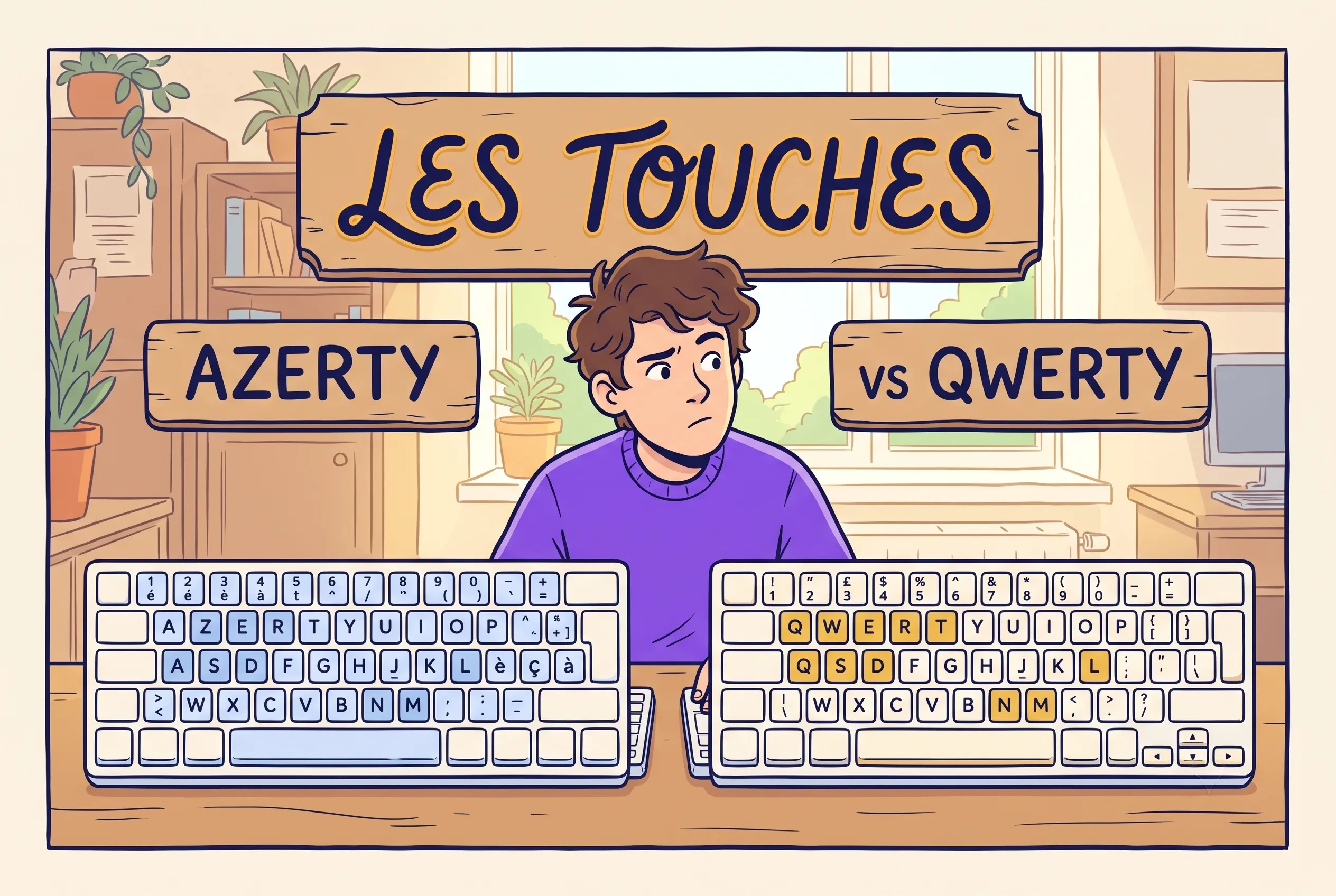
The letters are only part of the difference between keyboard layouts. Check punctuation, accents and your device settings before switching. The comparison helps you decide whether to change hardware or simply adjust the input layout.
France uses AZERTY because early keyboards were adapted language by language
AZERTY did not appear because French wanted to be difficult. It appeared because early keyboards were adapted to the writing habits of different languages. English typewriters settled around QWERTY. French kept the same broad idea but changed key positions so common French characters were easier to reach. The result is not perfect. It matches French writing better than plain QWERTY does.
Most beginner advice gets this wrong by treating the question as a shopping problem. The real issue is typing friction. If every accented vowel forces a workaround, you write less, hesitate more, and your French stays stuck in copy-paste mode. The same friction pattern shows up in the common mistakes guide: small mechanical obstacles that feel trivial individually but compound into avoidance.
What AZERTY really solves
Main point: it reduces friction for common French characters, especially accents and punctuation tied to French writing.
Why that matters: if writing feels slower than thinking, learners avoid writing. Layout design quietly affects practice volume.
AZERTY vs QWERTY: what actually changes under your fingers
The famous change is the name: QWERTY begins Q-W-E-R-T-Y, AZERTY begins A-Z-E-R-T-Y. But the beginner shock comes from three things together: letters moving, numbers needing Shift, and French accents becoming easier than symbols you used to type automatically.
| Criteria | QWERTY | AZERTY |
|---|---|---|
| Top-left letter keys | Q and W | A and Z |
| Number row default | Numbers first | Symbols first on many layouts |
| French accent access | Indirect or via layout tricks | Much more natural |
| Main beginner problem | Accents feel slow | Muscle memory feels wrong |
Typing French on QWERTY: what works and what stays annoying
You do not need a physical French keyboard to type French. A QWERTY keyboard can produce correct French if the system layout changes, if you use an international keyboard, or if your OS gives you accent shortcuts. The issue is speed and mental load, not possibility. For regular journaling, emails, or homework, the friction starts to matter more than people expect.
Start with the cheapest test. Before buying hardware, switch your computer to a French or international layout for three days. If accents suddenly feel easier, the layout is helping. If the letter swaps drive you crazy, stay in software first.
Yes, there is a shortcut: type it in English and let the machine hand back the accents. It works until the day it hands back a menu line that means something else entirely, and by then you have stopped producing French at all.
Set up the keyboard, then build the French
Sorting out AZERTY, QWERTY, and the accents handles the mechanical half of writing French. The other half is knowing what to type, and our nine free cheat sheets cover the essentials: key verbs, gender and agreement, the past tenses, survival phrases, and more. Enter your email and the free cheat sheet pack downloads right away.
How to set up AZERTY without making a mess
The safest approach is reversible setup. Add the French layout. Keep your original. Switch between them on purpose.
- 1Add the French layout Go to keyboard/language settings and add French as an input source instead of replacing your current layout.
- 2Keep the layout switch visible Show the input menu in the menu bar or taskbar so you always know which layout is active.
- 3Test in a blank document first Type the same short sentence in both layouts before using the new setup in real messages.
- 4Use one task in French only Pick one small activity (journaling, flashcards, short messages) and do it only with the French layout for a week.
Do not buy the keyboard before testing the layout. The expensive mistake is buying hardware before discovering whether AZERTY fits your routine. Test the software layout first.
How long AZERTY takes to learn
Shorter than most people fear, longer than most people hope. The first days feel clumsy because your hands replay old QWERTY habits. The first breakthrough comes when accents stop feeling like separate operations and start feeling like part of the word. The timeline follows the same logic as broader French progress: the realistic learning timeline applies to physical skills too.
If you decide to buy: keyboards and stickers worth considering
Test the software layout first. If AZERTY sticks and you want physical labels, these are the options that actually work without wasting money on novelty hardware.
⌨️ Cheapest real test: AZERTY stickers (~$5-8)
Transparent stickers that go over your existing QWERTY keys. You keep your keyboard, gain visual French labels, and find out whether AZERTY works for you before spending more. Apply in 10 minutes. The smartest first move for anyone unsure.
AZERTY transparent stickers (white letters) on Amazon
AZERTY opaque stickers (black background) on Amazon
⌨️ Best budget USB keyboard (~$15-25)
A basic wired AZERTY keyboard that you plug in alongside your QWERTY. Works for dedicated French typing sessions. No drivers, no configuration. Plug, switch system layout, type. Keep your QWERTY for everything else.
⌨️ Quality daily driver: Cherry KC 6000 Slim (~$40-50)
Cherry is the German keyboard brand that makes the switches inside most serious keyboards. Their AZERTY slim keyboard is quiet, flat, USB, and built for daily professional use. If you write French every day and want something that feels as good as your English keyboard, this is the reference.
⌨️ Professional option: Kensington Advance Fit (~$30-40)
Laptop-style scissor keys, USB 3.0, quiet typing. Good for shared offices where noise matters. Full AZERTY layout with number pad. Slim profile (19mm). The kind of keyboard that looks invisible on a desk, which is exactly what a daily tool should look like.
Kensington Advance Fit AZERTY on Amazon
The smart sequence. Stickers first ($5). If you use them for two weeks and still write French daily, upgrade to a dedicated keyboard. If not, you saved $40 and learned something about your actual habits.
Study glossary: French keyboard vocabulary
| 🇫🇷 French | 🇺🇸 English | 💡 Context |
|---|---|---|
| Un clavier / une touche | A keyboard / a key | The device and each individual key |
| La disposition AZERTY / QWERTY | AZERTY / QWERTY layout | French vs English keyboard arrangement |
| La touche Majuscule | The Shift key | Capitals, symbols, numbers on AZERTY |
| Un accent aigu / grave / circonflexe | Acute / grave / circumflex accent | é, è/à/ù, ê/ô |
| Un tréma / une cédille | A diaeresis / a cedilla | ë/ï/ü, ç |
| Le pavé numérique | The numeric keypad | Number block on full-size keyboards |
| La barre d’espace | The space bar | Long key at the bottom |
A new layout only fixes the written half. If French still turns to mush the moment it arrives as sound, the bottleneck has moved to your ear, and there is a mechanical reason normal speed arrives as one unbroken stream rather than words. Different problem, different fix. When the layout is fine but the evenings keep vanishing, fifteen minutes built to survive a bad workday beats the hour you never start. Both outlast a keyboard.
The A and Q swap is the part everyone talks about, and it is also the part that fades. The accents are what actually decide it: on AZERTY, é usually has its own key, while on QWERTY it arrives through a trick you have to remember every single time. That gap never shows up in one sentence. It shows up somewhere in the middle of an email, when you stop to think about a keystroke instead of a word.
Prefer to keep it free today? Read the French Briefing →
The French Gamebook
Check the small slips in otherwise good French.
For English speakers practising French
Use the Gamebook to revisit common mistakes, spot a gap and practise the point again. A review of the fundamentals to sit alongside your advanced reading and conversation.
- 21 lessons with explanations
- 40 practice rounds · 2,000 questions
300 pages · Play on your computer or print
Get the Gamebook · $9 Read a preview before you buyOne payment · Instant PDF download
Try the French with someone who can reply.
Bring a sentence you found difficult. Ask a tutor to help you say it naturally, then try it in a short conversation.
Find a French tutor →Paid lessons. Compare tutors and prices before booking.
Affiliate link: we may earn a commission when you book.
📚 Keep building in the Learning Center
French Learning Games for Adults: Pick a Format That Fits Your Life
French games for adults work best when the task feels useful and everyone can participate. Plan cooperative or…
Read →Learn French with a Game: Turn One Round into a Useful Study Session
To learn French with a game, choose one small language goal and make the rules serve it. Build…
Read →French Vocabulary Games: Remember the Word and Know What to Do with It
French vocabulary games can practise more than matching words to translations. Use sorting, recall and short exchanges to…
Read →